
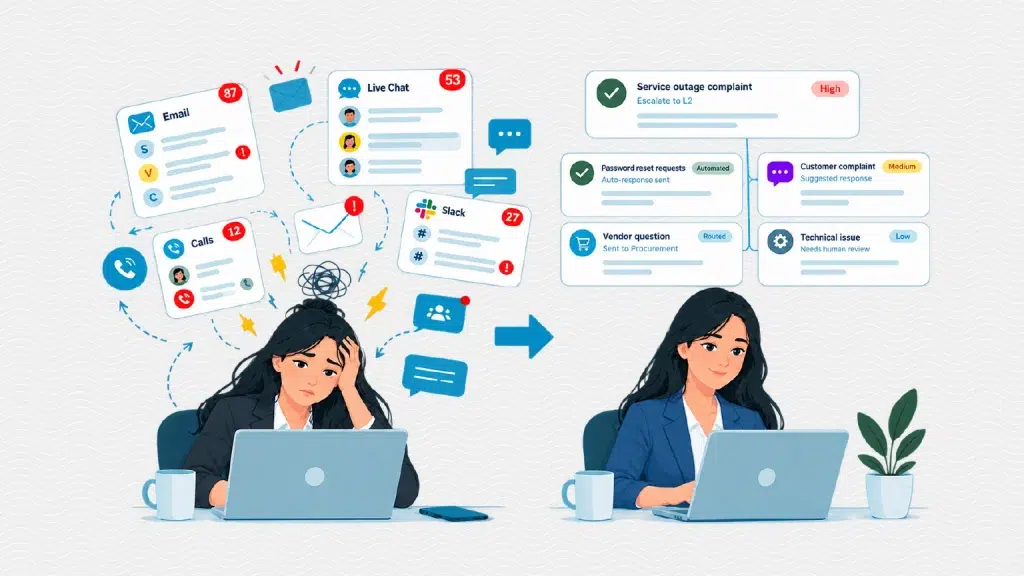
Sarah started her Monday by pulling up her various work platforms and felt her stomach drop. Two hundred and thirty-seven unread notifications – customer complaints flooding in through live chat, internal requests piling up in Slack, vendor questions buried in her email, and a string of angry social media messages about a delayed shipment. She had no system for managing any of it. She just started clicking through each platform, hoping to catch the urgent ones before they spiraled into emergencies.
This scene plays out daily in businesses of every size. Support and operations teams drown in requests that arrive from every direction – email, chat, social media, phone calls – with no central place to manage them. The result is predictable: important issues slip through, response times balloon, and employees spend more energy searching for information than actually solving problems.
Overflowing support inboxes slow teams down and frustrate customers. Helpdesk software like Faveo Helpdesk automates ticket routing, prioritisation, and repetitive responses, freeing employees to focus on complex problems. Teams that automate these workflows typically resolve issues 70% more efficiently, significantly reducing daily operational strain.
Helpdesk software was designed to fix exactly this problem. Modern systems take it a step further by using AI to handle common questions, filter out repetitive requests, and sort incoming tickets before a human even sees them. This means your team only deals with issues that actually need their attention – already organized and ready to act on. This two-tier approach highlights a simple truth about workplace productivity: most slowdowns aren’t caused by people not working hard enough. They happen because there’s no clear system in place.
Why Do Support Teams Struggle With Manual Workflows?
Manual workflows break down for a simple reason: human attention doesn’t scale. When requests arrive through scattered channels, someone has to manually read, sort, and assign each one. As volume grows, this process becomes slower and more error-prone.
Consider what happens without a centralised system:
- Duplicate work: Two team members unknowingly respond to the same ticket, wasting time and confusing the customer.
- Lost requests: An urgent issue gets buried under lower-priority emails and goes unanswered for days.
- Inconsistent responses: Without shared templates or history, different employees give conflicting answers to the same question.
- No accountability: When ticket ownership isn’t tracked, issues become nobody’s responsibility.
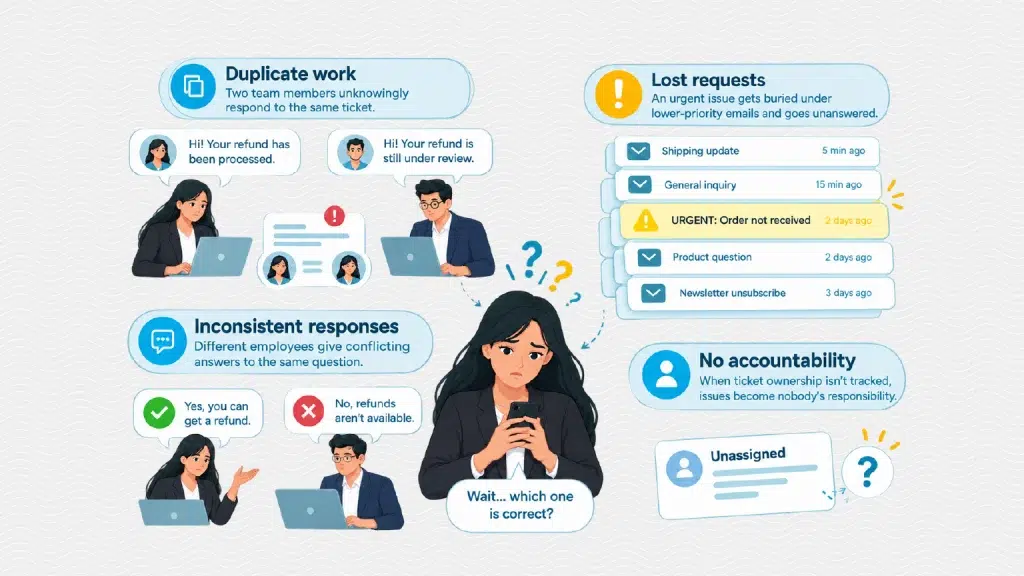
These aren’t hypothetical risks. They’re the daily reality for teams without a structured ticketing process. Sarah’s 237 queries weren’t a failure of effort. They were a failure of system design.
How Modern Helpdesk Software Automates Daily Workflows: AI First, Humans When It Matters
A helpdesk platform works by converting every incoming request – regardless of channel -into a single, trackable ticket. From there, automation takes over several tasks that would otherwise require manual effort.
Faveo Helpdesk, for example, automatically routes incoming tickets to the right department or agent based on predefined rules – such as keywords, customer type, or issue category. Instead of a manager manually assigning every ticket, the system handles distribution instantly.
Automation also extends to prioritisation. Urgent issues – like system outages or safety complaints can be automatically flagged and escalated, so they never get buried behind routine requests. This single feature tackles one of the most common failures in manual systems: treating every ticket the same, regardless of urgency.
Canned responses and templates handle another major time sink. Many support questions repeat themselves daily – password resets, shipping inquiries, and basic troubleshooting rarely require a custom-written reply. Faveo’s automation deploys pre-approved responses in seconds, so agents resolve these tickets without duplicating effort on something that’s already been answered dozens of times.
Reporting automation closes the loop on the back end. Instead of manually tracking response times or resolution rates, managers get dashboards that update in real time. That means less time compiling spreadsheets, and more time acting on what the data actually shows.
For more complex interactions, automation can still play a meaningful role. Faveo’s workflows are designed to handle multi-step exchanges – gathering key information, guiding customers through a process, and moving issues toward resolution without requiring a human to step in at every stage. This frees your support team to focus their time and energy on the cases that genuinely need a human touch.
Reporting automation closes the loop on the back end. Instead of manually tracking response times or resolution rates, managers get dashboards that update in real time – giving them instant visibility into team performance without ever opening a spreadsheet.
What Happens When Teams Automate These Tasks?
Let’s return to Sarah. Suppose her company implemented a centralised helpdesk system. Her 237 queries would no longer exist as an undifferentiated pile. They’d arrive as individual tickets, pre-sorted by urgency and department, many already carrying suggested responses based on similar past tickets.
The outage complaint would surface immediately, flagged for escalation. The password reset requests would be resolved through an automated response before Sarah even logs in. The vendor question would route directly to procurement, never touching her inbox at all.
This isn’t about replacing human judgment. It’s about reserving that judgment for situations that actually require it. When routine tasks are automated, employees spend their energy on complex, high-value work: resolving the ambiguous customer complaint, the escalated service failure, the unusual technical issue that no template can solve.
This shift matters beyond individual productivity. Teams that resolve tickets faster tend to see higher customer satisfaction, since response speed is one of the most consistently cited factors in customer service experience. Fewer dropped tickets also means fewer repeat complaints, which reduces overall support volume over time.
Who Benefits Most From Helpdesk Automation?
Helpdesk automation delivers the clearest value for organisations juggling high request volume across multiple channels or departments. A five-person team handling a trickle of emails may not need complex routing rules. But a growing company fielding requests from customers, internal staff, and vendors simultaneously will quickly feel the strain of manual sorting.
Choose a centralised, automated system if your team struggles with missed tickets, inconsistent response times, or unclear accountability for who owns which issue. If your current volume is low and manageable, the priority should be building good habits early, before volume grows past what manual processes can handle.
Build a System with helpdesk automation
Sarah’s inbox problem wasn’t really about the queries. It was about the absence of a system that could handle routine decisions automatically, leaving her free to focus on what actually required her judgment.
This is the broader lesson behind helpdesk automation: efficiency doesn’t come from working through requests faster one by one. It comes from building a structure that filters, prioritises, and resolves the predictable work before it ever reaches a person’s desk.
Whether you’re managing a customer support queue or an internal IT department, the question worth asking isn’t “how do I get through today’s requests?” It’s “why are these requests landing on my desk unsorted in the first place?” Platforms like Faveo Helpdesk exist to answer that question, turning chaotic inboxes into organised, actionable workflows.
FAQs
Helpdesk software centralises incoming requests from multiple channels – email, chat, phone, and social media – into a single ticketing system. It helps teams track, prioritise, and resolve issues more efficiently than managing requests manually.
Faveo Helpdesk automates ticket routing, prioritisation, and repetitive responses through canned replies and rule-based workflows. This reduces manual sorting time and allows employees to focus on complex, non-routine issues.
No. While customer support is a common use case, internal teams like IT, HR, and procurement also benefit from automated ticketing to manage employee requests and reduce response delays.
Without a centralised system, teams risk duplicate work, lost requests, inconsistent responses, and unclear accountability. These issues typically worsen as request volume grows.
Businesses should consider adopting helpdesk software once manual processes start causing missed tickets, slow response times, or confusion over task ownership. Growing request volume across multiple channels is usually the clearest signal.